Sunday, May 18, 2008


Sunday, March 9, 2008
Free and Open Source Software
Many in the non Windows world are confused between Free/Open source software. Free software is considered to free of cost while open source software is considered software with source given to you . These 2 camps have different philosophies. This really confuses many people and even I was confused when i had come across these terms. It took some time for me to actually understand what these actually mean. Below is a short attempt from me.
Free Software: In terms of cost these can be free of cost or NOT. The free part is the freedom you will be given to modify,redistribute this software to others. Just FYI non free software not necessarily give you the legal rights to modify,redistribute the modified software. Thus cost is not the philosophy behind it. Free software can be charged . A software to be called as Free software needs to fulfill the requirements which they have defined.
This is the quote from the website of Free Software Foundation
``Free software'' is a matter of liberty, not price. To understand the concept, you should think of ``free'' as in ``free speech,'' not as in ``free beer.''
If you need the full text check the Free Software Definition available at FSF.
http://www.fsf.org/licensing/essays/free-sw.html
Linux is an example of Free Software for it allows anybody to see,modify,redistribute the software.Only the name "Linux" is copyrighted, the code is not.
Open Source: Open source is a branched out version of free software with some philosophical differences. The software which falls in this category are software for which the source of these will be given to you but not necessarily you can change or redistribute it. For eg Company ABC might make a software open source but it might not give the rights to anybody to modify the software and would own full rights to it. This would be the software with a company selling software to a defense organization who might to know what the code actually does so that it does not compromise on security. They may not want to change the software though.
Free Software: In terms of cost these can be free of cost or NOT. The free part is the freedom you will be given to modify,redistribute this software to others. Just FYI non free software not necessarily give you the legal rights to modify,redistribute the modified software. Thus cost is not the philosophy behind it. Free software can be charged . A software to be called as Free software needs to fulfill the requirements which they have defined.
This is the quote from the website of Free Software Foundation
``Free software'' is a matter of liberty, not price. To understand the concept, you should think of ``free'' as in ``free speech,'' not as in ``free beer.''
If you need the full text check the Free Software Definition available at FSF.
http://www.fsf.org/licensing/essays/free-sw.html
Linux is an example of Free Software for it allows anybody to see,modify,redistribute the software.Only the name "Linux" is copyrighted, the code is not.
Open Source: Open source is a branched out version of free software with some philosophical differences. The software which falls in this category are software for which the source of these will be given to you but not necessarily you can change or redistribute it. For eg Company ABC might make a software open source but it might not give the rights to anybody to modify the software and would own full rights to it. This would be the software with a company selling software to a defense organization who might to know what the code actually does so that it does not compromise on security. They may not want to change the software though.
Thursday, November 29, 2007
Installing Fedora 8 from hard disk
As many might be aware it is possible to install Fedora and many other Linux distributions from media other than CD/DVD's.
I installed Fedora 8 from my hard disk . My machine is quite old with just a CD writer in it ( am a poor guy after all) . I did have a Broadband connection using which i had downloaded the DVD iso of fedora 8. I had the option of creating and burning 5 CD's but installation from hard disk had the advantage of speed over regular CD's. Also my installation would be faster coz i don't have to keep putting in cd's during the installation. The only CD i had created was the boot CD which was used to start the Installtion process (although it was not necessary as i later came to know).
Here are the steps which need to be followed for installing Fedora DVD version from the hard disk.
Step1 : Download the DVD iso from the Fedora project website at http://fedoraproject.org/.
You can also copy it to your disk from your friends hard disk who already has the iso.
Step2: Check if a FAT32 partition is available on your hard disk which can accommodate the DVD iso. ( i did try installing with other Linux file systems such as ext2, ext3 but was not successful. Still am not sure whether i did try all combinations) . Save the iso file in the root of the partition and not inside any folder (still not sure why it never worked for me when i placed the iso in folders). I created a partition and formated it with the FAT32 filesystem.
In my case the partition name was /dev/sda9 . I mounted it and copied the DVD iso in the root of the partition.
Step3: Thats it! we are now ready for installation.
Step4: Once the installation starts it would ask for the media you want the installation to start. Select the media as had disk and then in the next screen put in the path eg. /dev/sda9. It would let you choose the iso file and from that point the magic begins.
The installation speed is also much higher compared to a regular CD/DVD installation .These steps are distribution dependent and can be applied for other distributions also.
I installed Fedora 8 from my hard disk . My machine is quite old with just a CD writer in it ( am a poor guy after all) . I did have a Broadband connection using which i had downloaded the DVD iso of fedora 8. I had the option of creating and burning 5 CD's but installation from hard disk had the advantage of speed over regular CD's. Also my installation would be faster coz i don't have to keep putting in cd's during the installation. The only CD i had created was the boot CD which was used to start the Installtion process (although it was not necessary as i later came to know).
Here are the steps which need to be followed for installing Fedora DVD version from the hard disk.
Step1 : Download the DVD iso from the Fedora project website at http://fedoraproject.org/.
You can also copy it to your disk from your friends hard disk who already has the iso.
Step2: Check if a FAT32 partition is available on your hard disk which can accommodate the DVD iso. ( i did try installing with other Linux file systems such as ext2, ext3 but was not successful. Still am not sure whether i did try all combinations) . Save the iso file in the root of the partition and not inside any folder (still not sure why it never worked for me when i placed the iso in folders). I created a partition and formated it with the FAT32 filesystem.
In my case the partition name was /dev/sda9 . I mounted it and copied the DVD iso in the root of the partition.
Step3: Thats it! we are now ready for installation.
Step4: Once the installation starts it would ask for the media you want the installation to start. Select the media as had disk and then in the next screen put in the path eg. /dev/sda9. It would let you choose the iso file and from that point the magic begins.
The installation speed is also much higher compared to a regular CD/DVD installation .These steps are distribution dependent and can be applied for other distributions also.
Fedora 8
Finally I made the jump and installed Fedora 8 on my machine. After using it for some days I can say that it is a quite stable version as i have not come across any thing that is broken till now. Overall a nice polished and more refined version than previous versions. All those looking to upgrade can surely go for it without having second thoughts.
I did have issues installing it but probably thats more due to my lack of knowledge. I did learn some new things while installing it. I will be posting a separate post for the method i used for installation and which i think may be useful to those with old machines.
I did have issues installing it but probably thats more due to my lack of knowledge. I did learn some new things while installing it. I will be posting a separate post for the method i used for installation and which i think may be useful to those with old machines.
Sunday, October 21, 2007
OpenOffice 2.3
I recently upgraded to OpenOffice 2.3 and was in for a little surprise. Nopes there was not any bright lights coming in. The program simply could not start and would give out an error "no suitable windowing system found, exiting."
As always the next step was to Google about it. After some googling I did find an solution for this. Open Office 2.3 had a problem if SELinux was enabled and SELinux was enabled by default in my Fedora Core5 and may be later versions of Fedora
The solution was to run the following command in the 'program' directory where OpenOffice is installed. In my case i had installed it under /opt/openoffice.org2.3
cd /opt/openoffice.org2.3/program
chcon -t texrel_shlib_t *.so
This did solve the problem and i was able to start the OpenOffice application correctly.
Moral of the story:
Be ready for surprises whenever you upgrade as things may not work out smoothly always.
As always the next step was to Google about it. After some googling I did find an solution for this. Open Office 2.3 had a problem if SELinux was enabled and SELinux was enabled by default in my Fedora Core5 and may be later versions of Fedora
The solution was to run the following command in the 'program' directory where OpenOffice is installed. In my case i had installed it under /opt/openoffice.org2.3
cd /opt/openoffice.org2.3/program
chcon -t texrel_shlib_t *.so
This did solve the problem and i was able to start the OpenOffice application correctly.
Moral of the story:
Be ready for surprises whenever you upgrade as things may not work out smoothly always.
Sunday, October 14, 2007
Regrets on Linux migration
Came across a piece of info for to be Linux users on taragana.com .
Heres the link .
http://blog.taragana.com/index.php/archive/top-5-regrets-after-migrating-from-windows-to-linux/
Heres the link .
http://blog.taragana.com/index.php/archive/top-5-regrets-after-migrating-from-windows-to-linux/
Thursday, September 27, 2007
Google Desktop
Those Linux users who use Google for every internet search will be happy to hear that there exists a Linux version of Google Desktop - the Desktop search tool. Now u can get blazing fast search results in seconds. The tool is amazing. It literally feels like the real Google on your machine.Like most modern search tools it runs in background and utilizes the idle time available on your machine. It maintains an index of all the available files and searches this index when you type in an filename to search. First time usage will be slow and will not show all the results since the indexing process may not be completed. The status of the indexing process can be seen from the index -> Status option available which looks like the one in this screen shot.

The tool also has options to exclude items from indexing so that they do not appear in search results. Also it integrates nicely with the on line version merging the on line search results with the desktop one.
Overall a nice tool but be warned that once you get into the habit of using it you might get addicted and may behave weirdly in situations where you cannot get to use the tool.

The tool also has options to exclude items from indexing so that they do not appear in search results. Also it integrates nicely with the on line version merging the on line search results with the desktop one.
Overall a nice tool but be warned that once you get into the habit of using it you might get addicted and may behave weirdly in situations where you cannot get to use the tool.
Saturday, September 22, 2007
XMMS song names in Pidgin Status.
I was wondering on how to display my song title as the status for Pidgin much like provided by 3rd party tools for yahoo messenger or for Gtalk when i came across this piece of info.
xmms has a built in plugin called 'Song Change' which allows one to execute any command when a song changes or when the play list ends.
Pidgin also has a command line tool called 'purple-remote' where in one can send commands to Pidgin.
This is all the information you will need.Put the following command to the xmms plugin configuration box
purple-remote "setstatus?message=%s"
xmms would replace the %s with the song title.
Now start a song and Voila! the song title appears in Pidgin status.
xmms has a built in plugin called 'Song Change' which allows one to execute any command when a song changes or when the play list ends.
Pidgin also has a command line tool called 'purple-remote' where in one can send commands to Pidgin.
This is all the information you will need.Put the following command to the xmms plugin configuration box
purple-remote "setstatus?message=%s"
xmms would replace the %s with the song title.
Now start a song and Voila! the song title appears in Pidgin status.
Messengers!!!!!!!
Pidgin previously known as 'gaim' is a kool multi protocol messneger available for Linux.


You can have your yahoo, gtalk contacts in a single place . The interface is cool without the usual bloat added by other messengers.

PS. On my Fedora core 5 system the application installed correctly but would not start. I found the problem already logged in at the pidgin bug database and the solution also . The problem it seems was that pidgin required a new version of library called lib-purple whereas in fedora core 5 a older version was present. Updated my lib-purple library and then pidgin popped up on the screen with its full glory.

PS. On my Fedora core 5 system the application installed correctly but would not start. I found the problem already logged in at the pidgin bug database and the solution also . The problem it seems was that pidgin required a new version of library called lib-purple whereas in fedora core 5 a older version was present. Updated my lib-purple library and then pidgin popped up on the screen with its full glory.
Sunday, September 9, 2007
LAMP
Many newbies in the Linux world hear regularly about LAMP. LAMP is a acronym used for the combination of LINUX, APACHE, Mysql and PHP . This combination is used to develop and power web based solutions. All of the components are free and open source. LAMP is quite popular the reason being that all the components are really good in doing their job.
Also the 'AMP' in LAMP ensures portability since your solution would not depend upon the operating system. So the development of such a solution might happen in Linux but the deployment of the solution may be on a Windows server. The migration to any other OS would be trouble free as your solution would only depend upon Apache,Mysql and PHP.
Though 'AMP' ensures portablity its recommended to use the 'full' LAMP for your solutions as the software stack has undergone rigorous testing by thousands of people who have successfully deployed it in production web sites.
Also the 'AMP' in LAMP ensures portability since your solution would not depend upon the operating system. So the development of such a solution might happen in Linux but the deployment of the solution may be on a Windows server. The migration to any other OS would be trouble free as your solution would only depend upon Apache,Mysql and PHP.
Though 'AMP' ensures portablity its recommended to use the 'full' LAMP for your solutions as the software stack has undergone rigorous testing by thousands of people who have successfully deployed it in production web sites.
Tuesday, September 4, 2007
ext3 in Windows
Recently I had a experience where in i had to reverse the migration of Linux to Windows. Although I was not really happy doing it , the job needed to be done. I needed information which was present in the Linux system and needed to be copied to the Windows system. The difficult part used to be that moment when i used to realize that the info needed by me was present in the ext3 file system which needed a reboot in to the Linux System.
But as they "Necessity is the mother of Invention"..I googled for something which would allow me to read the ext3 file system in Windows and within minutes i was using a tool called LinuxReader by DiskInternals. The program has a Windows Explorer like interface and does its job pretty well. I was able to access all my files and could save into the Windows file system.

A good tool for those dual booting between Windows and Linux and looking to share information between the 2 systems.
The only disadvantage is that this tool can only read ext2/ext3 file systems and will be of no use if u r file system is different.
But as they "Necessity is the mother of Invention"..I googled for something which would allow me to read the ext3 file system in Windows and within minutes i was using a tool called LinuxReader by DiskInternals. The program has a Windows Explorer like interface and does its job pretty well. I was able to access all my files and could save into the Windows file system.
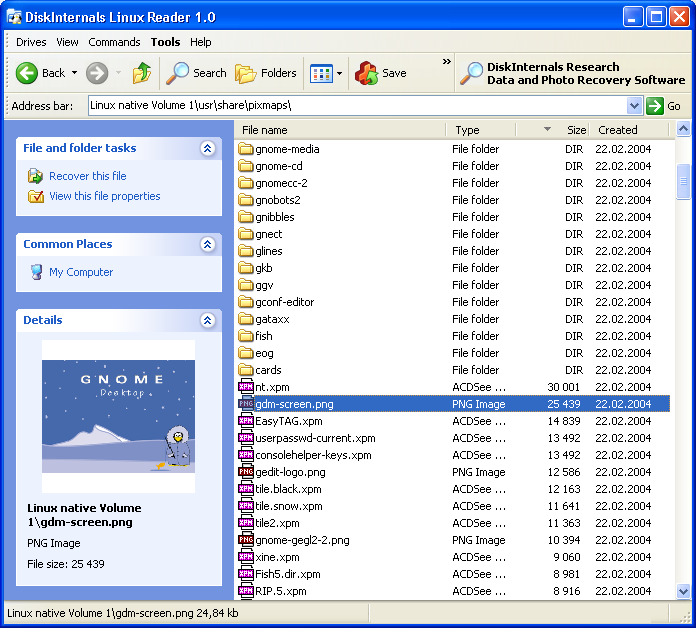
A good tool for those dual booting between Windows and Linux and looking to share information between the 2 systems.
The only disadvantage is that this tool can only read ext2/ext3 file systems and will be of no use if u r file system is different.
Thursday, August 23, 2007
Lets Rock!
U have installed u r favorite Linux Distribution and now r ready to rock. The next thing required would be something which can play your precious music collection. In the Windows world Winamp was the good old music player. The good news is that there's a similar application available called XMMS. It was written to be a clone of Winamp. It looks similar , it can even use Winamp skins, so that u feel at home when using it.
Here's a screen shot. Can u tell the difference ????

Here's a screen shot. Can u tell the difference ????
Tuesday, August 21, 2007
Office Office...
I keep on hearing many success stories of Windows to Linux migration . I feel some major credit should go to OpenOffice for making these migrations successful (atleast for non-technical users) .

Any Office package mainly consists of a Word processor, a Spreadsheet software and most probably a Presentation software. There are many packages available in Linux which can be called as an Office package. I personally feel OpenOffice is the best one can get in the Linux world, although there are many who hate OpenOffice for being bloated and terribly slow. I wouldn't oppose this argument coz these are true to a certain extent but its advantages outweigh its disadvantages.
The official site is at http://www.openoffice.org
At last what matters is personal taste...and the best of the lot can only be found by experimenting.

Any Office package mainly consists of a Word processor, a Spreadsheet software and most probably a Presentation software. There are many packages available in Linux which can be called as an Office package. I personally feel OpenOffice is the best one can get in the Linux world, although there are many who hate OpenOffice for being bloated and terribly slow. I wouldn't oppose this argument coz these are true to a certain extent but its advantages outweigh its disadvantages.
The official site is at http://www.openoffice.org
At last what matters is personal taste...and the best of the lot can only be found by experimenting.
Sunday, August 19, 2007
Fedora Menu Editor
I have been using Gnome 2.14 with Fedora core 5 for some time but recently felt the need to edit menus. At that point I realized that a simple menu editor was missing for Gnome. I tired to look in the menus but could find nothing. At last i googled for the info and found some piece of info which made me laugh at myself. The editor was sitting right in front of me but i couldn't notice it. Actually it was not fully my fault . The editor is only accessible if u 'Right Click' on the Feodra Logo sitting usually on the top left corner of u r screen (unless u have changed it) . The logo can be seen in the following image.
The Menu editor looks as follows

This is a basic Menu editor but is sufficient for the job most of the times.

The Menu editor looks as follows

This is a basic Menu editor but is sufficient for the job most of the times.
Saturday, July 14, 2007
GIMP ! is that a chimpanzee ???
GIMP is the GNU Image Manipulation Program.It is a software similar to Photoshop and has many features which makes it a strong competitor.
Many people and even those in the world of graphic designing have not heard about these tool. This tool is freely available on all major Linux distributions and other operating systems such as Windows. So u might already be having it on u r system.
The official website is at http://www.gimp.org/
I found a tutorial while googling for some gimp help at http://www.troubleshooters.com/linux/gimp/
Will post it here as i find some more....
Meanwhile Happy Gimping!!!!
Many people and even those in the world of graphic designing have not heard about these tool. This tool is freely available on all major Linux distributions and other operating systems such as Windows. So u might already be having it on u r system.
The official website is at http://www.gimp.org/
I found a tutorial while googling for some gimp help at http://www.troubleshooters.com/linux/gimp/
Will post it here as i find some more....
Meanwhile Happy Gimping!!!!
Wednesday, May 16, 2007
IE in Linux
In my previous post I had written about IE specific websites. Though u may have started using Linux and are really loving u r Firefox browser there are many more who use Windows and Internet Explorer on their systems and such users are the dominant force. Many web developers therefore create IE specific websites and don't care about the rest non IE users.
This doesn't mean that u have to throw away u r Linux and go for Windows where IE is available. ies4linux comes to the rescue. It uses WINE and runs IE on top of it. The application comes with a script which does all the job right from downloading the required dlls to installation . No extra configuration needed.
Till the time IE specific websites are created software such as ies4linux would be saving non Windows users from considerable pain.
This doesn't mean that u have to throw away u r Linux and go for Windows where IE is available. ies4linux comes to the rescue. It uses WINE and runs IE on top of it. The application comes with a script which does all the job right from downloading the required dlls to installation . No extra configuration needed.
Till the time IE specific websites are created software such as ies4linux would be saving non Windows users from considerable pain.
Tuesday, May 15, 2007
IE specific Webservices
The only thing almost all non windows users may miss from time to time is Internet Explorer on their systems. Though with Firefox now on the rise this need has gone to a drastically low level but there are some instances when u need IE coz the website which u r visiting may provide some service which simply refuses to work on non IE browsers.
I have found 2 categories where IE is forced on u. One being the use of ActiveX controls on the webpage which simply cannot work on non Windows OS such as Linux. I hope all such service providers provide a desktop version for everybody for their respective OS.
The other category of websites come under lame coder websites who prefer to use VBScript in their webpages instead of Javascript . I simply cannot understand their logic behind this. Just because the developer knows only VBScript is really a pathetic excuse for any body to give. Even Microsoft the inventor of VBScript themselves don't use Vbscript everywhere and instead use Javascript in many places.
Infact such websites reduce their coverage (in this case non Windows users) and they are the ones to lose finally.
I have found 2 categories where IE is forced on u. One being the use of ActiveX controls on the webpage which simply cannot work on non Windows OS such as Linux. I hope all such service providers provide a desktop version for everybody for their respective OS.
The other category of websites come under lame coder websites who prefer to use VBScript in their webpages instead of Javascript . I simply cannot understand their logic behind this. Just because the developer knows only VBScript is really a pathetic excuse for any body to give. Even Microsoft the inventor of VBScript themselves don't use Vbscript everywhere and instead use Javascript in many places.
Infact such websites reduce their coverage (in this case non Windows users) and they are the ones to lose finally.
Sunday, May 6, 2007
WINE ??? A BEER for me please...
Sorry to disappoint a lot of my friends but WINE in this case is simply another piece of software present in Linux.
The official definition states the following "Wine Is Not a (CPU) Emulator."
Wine just provides the windows API for u r windows software to run under Linux , It comes as a blessing when u r stuck with the Windows only version of u r favorite software in Linux.
Head on to WINE home at http://www.winehq.org/ for all the info u would ever need about it.
Although its a good attempt but i must say that its still not perfect . Since it tries to emulate Windows API, where there are many undocumented features there are times when not all u r favorite software may run under it as it may be using those undocumented features.
During such times its best to pray that there exists a similar or better version or clone of the software u are suck with. A little bit of Googling helps in almost all such cases though.
Many recent distributions come with the latest stable version of WINE and are also configured to execute Windows executable's with WINE.
So just click and see u r Windows program's come alive in Linux with some WINE :) .
The official definition states the following "Wine Is Not a (CPU) Emulator."
Wine just provides the windows API for u r windows software to run under Linux , It comes as a blessing when u r stuck with the Windows only version of u r favorite software in Linux.
Head on to WINE home at http://www.winehq.org/ for all the info u would ever need about it.
Although its a good attempt but i must say that its still not perfect . Since it tries to emulate Windows API, where there are many undocumented features there are times when not all u r favorite software may run under it as it may be using those undocumented features.
During such times its best to pray that there exists a similar or better version or clone of the software u are suck with. A little bit of Googling helps in almost all such cases though.
Many recent distributions come with the latest stable version of WINE and are also configured to execute Windows executable's with WINE.
So just click and see u r Windows program's come alive in Linux with some WINE :) .
Help! My C Drive is missing in Linux..
This is a common scenario....u have installed Linux. u r really excited about it and immediately start checking out the software, games and other cool things already present in the package. After a certain amount of time (which is directly proportional to the level of u r excitement) u realise that u r not able to find u r games , pictures, documents etc which was present on u r Windows system. You start looking for the panic button.
Relax! U r data is most probably safe , depending upon which options u chose on the partition screen during install time.
For accessing other filesystems u need to "mount" that filesystem in Linux.
Windows uses 2 types of file systems FAT32 and NTFS . If ur Windows data is on a FAT32 partition u needn't worry much as almost all of the popular Linux distributions have FAT32 support enabled. If u Windows system uses NTFS as its file system then a little bit of extra work is needed.
Read the following info on http://www.tuxfiles.org/linuxhelp/mounting.html for some information regarding mounting.
For those with NTFS system ,head on to http://www.linux-ntfs.org/and download the required packages for u r system.
Follow the documentation and if everything goes well , u will be having access to u r documents,pictures etc in Linux also.
Relax! U r data is most probably safe , depending upon which options u chose on the partition screen during install time.
For accessing other filesystems u need to "mount" that filesystem in Linux.
Windows uses 2 types of file systems FAT32 and NTFS . If ur Windows data is on a FAT32 partition u needn't worry much as almost all of the popular Linux distributions have FAT32 support enabled. If u Windows system uses NTFS as its file system then a little bit of extra work is needed.
Read the following info on http://www.tuxfiles.org/linuxhelp/mounting.html for some information regarding mounting.
For those with NTFS system ,head on to http://www.linux-ntfs.org/and download the required packages for u r system.
Follow the documentation and if everything goes well , u will be having access to u r documents,pictures etc in Linux also.
Sunday, April 29, 2007
Programming and Linux ...
Linux is known to be as a programmer's OS i.e that the OS had been built by programmers for programmers. It is really a good system to learn programming on. The OS design is really neat and best of all its open. Everything is well documented . You know how and why a particular thing works and that's what every programmer wants , coz programmers are inquistive by nature.
The best thing i like about is everything is file based. What this means is that almost everything on the OS is configurable by changing the right settings. If u know what exactly u are doing u can write u r own shell script for small tasks or write a full fledged program in u r favorite language to perform the function u need instead of depending on some external tools which will some other bells and whistles attached to it.
I have been a Visual basic programmer myself and i must say that i enjoy programming in Linux much greater than in Windows.
Its not necessary for u to be C or a C++ programmer to program under Linux. C or C++ is best suited for system level programming. There are lot of applications which can be written in a language such as Java. Many also prefer Python which is also a popular OO language.
So don't worry, be Happy....Start Programming under Linux.
The best thing i like about is everything is file based. What this means is that almost everything on the OS is configurable by changing the right settings. If u know what exactly u are doing u can write u r own shell script for small tasks or write a full fledged program in u r favorite language to perform the function u need instead of depending on some external tools which will some other bells and whistles attached to it.
I have been a Visual basic programmer myself and i must say that i enjoy programming in Linux much greater than in Windows.
Its not necessary for u to be C or a C++ programmer to program under Linux. C or C++ is best suited for system level programming. There are lot of applications which can be written in a language such as Java. Many also prefer Python which is also a popular OO language.
So don't worry, be Happy....Start Programming under Linux.
Subscribe to:
Posts (Atom)